
















































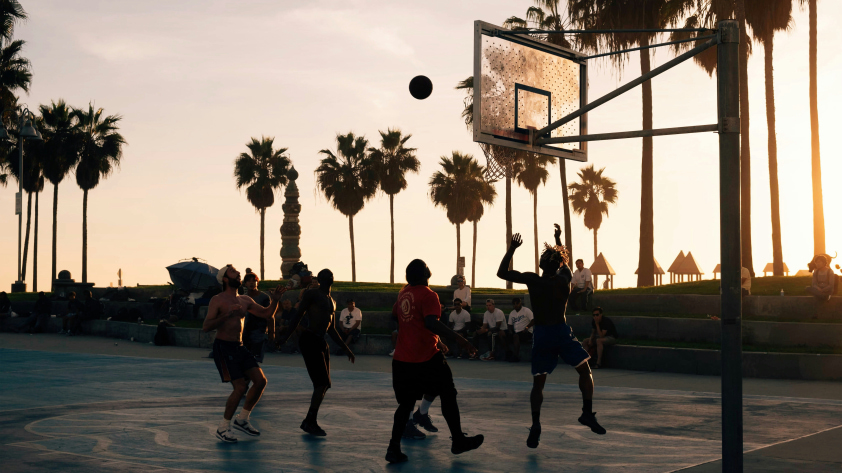


Recording basketball games differs from filming other sports games. The courts are smaller, play is continuous and possession switches sides multiple times a minute. Keeping up with the game's fast-paced nature can be tricky, and especially tiring if you’re doing so manually.
The best cameras for basketball games produce smooth, high-quality footage. Whether you’re a coach recording games for analysis or a parent recording your kid’s highlights, the best basketball cameras allow you to stay immersed in the action without worrying about missing a highlight.
Selecting a camera can be overwhelming, but we’re here to help. Find out how to choose the ideal camera for recording basketball games.
AI-Powered Tracking for Hands-Free Basketball Recording
Cameras with built-in follow-cam technology automatically keep the action framed without your input, creating the broadcast experience you love watching on TV. AI tracking allows you to capture every highlight hands-free, allowing you to focus on the game, whether as a coach or a fan.
Insta360 Flow 2 Series turns your phone into the perfect basketball action camera. AI-tracking technology allows you to track a variety of subjects, whether you want your camera to follow the ball or a player. Flow 2 Pro’s DockKit compatibility supports native iOS tracking across over 200 iOS apps, turning your iPhone into a content-creating machine.
Shooting with Hoop Mode on the Insta360 app tracks full-court action, recognizing every basket and creating game highlights. Flow 2 Series AI tracker enhances tracking precision across all apps and phones—it identifies and tracks subjects in complex environments, ensuring you capture the action, no matter how fast-paced.
Built-in Stabilization for Smooth, Professional-Looking Video
Basketball games involve sudden shifts, jumps and falls. You may capture blurry footage if the camera you’re using isn’t equipped to handle these movements. Action cameras with built-in image stabilization eliminate camera shake and vibrations, delivering smooth footage when the action gets rough.
Flow 2 Series uses 3-axis stabilization to keep footage perfectly level and stable as you and your subject move. These gimbals are perfect for when you’re moving up and down the sidelines. They can also be set up with their built-in tripod and motion tracking for hands-free footage. Smooth movement ensures sharp quality, no matter how fast-paced the action.
Insta360 GO 3S’s FlowState Stabilization produces incredibly smooth footage. It removes every bump and vibration, making it perfect for POV basketball footage, maintaining a clear and smooth video during the fast break or when moments get especially rough.
Capture 4K60FPS+ HDR for Sharp Detail & Smooth Motion
A high frame rate and resolution is essential for capturing high-quality footage without missing a detail. Viewing every play in total clarity allows you to analyze games better or enjoy the highlights.
Higher resolution results in higher quality video. 1080p is often acceptable for everyday filming, but 4K resolution delivers professional-looking results. This higher resolution produces sharp detail and clear footage, delivering cinematic results.
Basketball is full of fast-paced action, so you need a camera that can keep up with quick movement. A high frame rate is essential to capturing fast plays with clarity. Lower frame rates can make quick movement look choppy. A camera that shoots in 4K60fps is ideal for detailed footage. 120fps or higher is recommended for slow-motion playback.
GO 3S records in 4K at 30fps. The tiny action cam produces high-quality footage with sharp detail, making it ideal for capturing dramatic POV action without affecting your game.
Travel Light With Portable, On-The-Go Filming for Basketball
The basketball season requires a lot of travel, which means hauling your recording equipment back and forth. Carrying bulky devices to different courts not only makes travel more difficult, but it can also make the recording process less enjoyable. Keep portability in mind when choosing which camera is right for you.
You also need to consider how you plan on recording. If you’re looking for something handheld, weight will be a greater factor since you won’t want to be lugging a hefty camera the entire game. If you plan on recording POV footage of your games, you’ll need a lightweight, compact camera that won’t affect your game. The best basketball POV cameras are those you don’t even know are there.
Lightweight gimbals like those in Flow 2 Series allow you to record on the sideline without getting tired, or you can set them down using their built-in tripod. When it comes to cameras, GO 3S weighs roughly 39 grams and is the size of a thumb drive. This tiny camera records high-quality POV footage without affecting your game.
Power Through the Game With Long Battery Life
There’s little as frustrating as recording the first half of a game only for your camera to die during the second. It can also be troublesome trying to charge your camera at halftime or interrupting your footage with a battery change. Investing in a camera with long battery life will ensure you capture everything, including the dying moments of the game.
Flow 2 Series features a power bank built into the gimbal, allowing you to charge your phone and continue shooting for up to 10 hours. GO 3S offers up to 38 minutes of POV footage. Pair it with the Action Pod for up to 140 minutes of shooting.
Mount With Versatility: Flexible Mounting for Steady Angles
Capturing the best shots requires some creativity, so you don’t want to be limited by your camera. Having a device with versatile mounting capabilities allows you to capture every shot you can think of and may even inspire shots you never knew were possible.
With Flow 2 Pro, you can capture a wide range of shots. The gimbal offers perfectly still handheld recording but includes features that add versatility. The built-in selfie stick extends the gimbal for capturing high or low-angle shots. The built-in tripod lets you go completely hands-free and capture footage from a stationary pivot point.
Capture creative action shots with GO 3S. The tiny powerhouse can be mounted in various places, limited only by your mind. Mount it onto your chest using the Magnet Pendant for POV footage or clip it to your wristband with the Easy Clip for close-up dribbling action. You can even stick it onto the hoop with the Pivot Stand to capture every basket.
The Insta360 GO 3S Headband Pivot Mount allows you to capture true POV basketball footage. No longer worry about your camera being knocked off your chest when fighting for possession. The headband mount offers a greater view of the game while keeping your hair and sweat out of your eyes.
Create Instant Highlights With Tagging and Drawing Tools
Capturing footage is half the battle. Editing is often needed to get the most out of your recordings. Cameras with dedicated editing software can streamline the process with useful tools. Tag players and use drawing tools to analyze footage right after a game, or annotate highlights to produce shareable clips.
Shoot in Hoop Mode with the Insta360 app to track every basket. Save yourself the time of editing and let your device automatically create a highlight reel.
Frequently Asked Questions
What Is the Best Way to Video a Basketball Game?
Use a camera with a wide-angle lens to capture as much of the court as possible. Opt for one with AI-tracking technology to follow full-court action. Insta360’s Hoop Mode creates a highlight of every basket, saving you the trouble of stitching a highlight reel together.
What Camera Is Best for Capturing Action Shots?
For high-motion activities like basketball, biking, skiing, and skateboarding, look for a lightweight camera with strong stabilization and hands-free mounting options. Insta360 action cameras use FlowState Stabilization and 360° Horizon Lock to keep footage smooth, even during sharp turns and jumps.
Ready To Capture Your Basketball Games With Insta360?
The right camera can make all the difference when capturing basketball footage. The camera you opt for will depend on the type of footage you wish to capture. A light, compact camera with high stability is essential for POV shots, while one with reliable AI tracking is ideal for sideline footage. Insta360 offers a variety of action cameras, including Flow 2 Pro and GO 3S, and accessories to fulfill your every need. Capture basketball footage the way you want to today!
Keen to keep up to date on Insta360 stories? Keep an eye on our blog and sign up for our mailing list. Got a story to share? Email yours to communitystories@insta360.com and win up to US$50.






%20(1).svg)


%20(1).svg)

.svg)


