






































How to format SD card?
-
- Insta360 Nano S supports UHS-I,exFAT(FAT64) SD card (up to 128G). If SD card error occurs, please following the steps to format:
-
- Windows:
- 1.Insert SD card to Nano S and press the power button to turn it on.
- 2.Connect the Nano S to your computer via the USB connector.
- 3.Click 'My Computer' -> right click 'Removable disk' -> click 'Format'.
- 4.Select 'exFAT' in File system, '128 kilobytes' in Allocation unit size -> click 'Start' to format.
-
- Mac:
- 1.Insert SD card to Nano S and press the power button to turn it on.
- 2.Connect the Nano S to your computer via the USB connector.
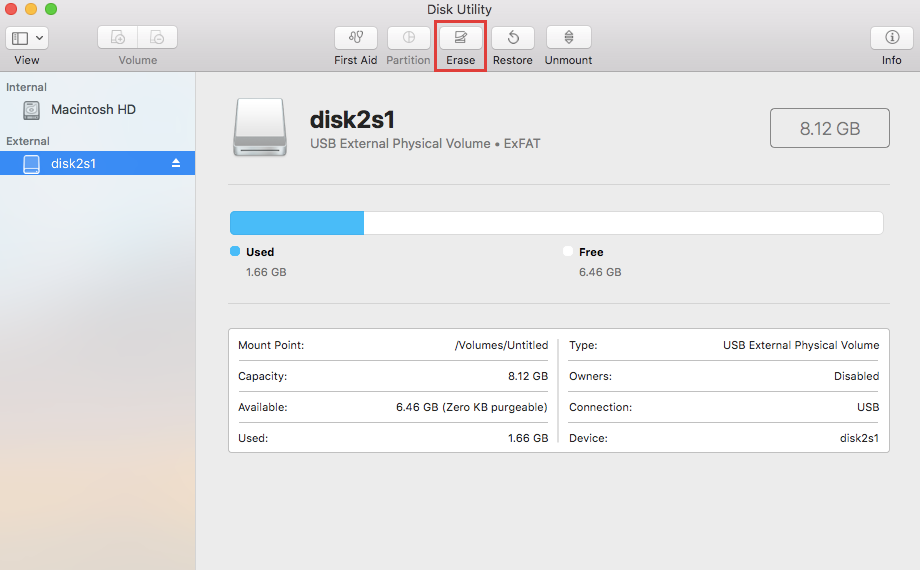
- 3.Run 'Disk Utility' applications on mac -> select 'Ambarell A9 DSC EVK Platf Media' -> click 'Erase'
-
- 4.Select 'ExFAT' -> click 'Erase' to start format.
Was this information helpful?
.svg)


Insta360 Trade-In
使っていない機材を価値に変えよう。
詳しくはこちら
メーリングリストに登録
Insta360の最新ニュースをゲット

私はプライバシーポリシーに同意し、Insta360の最新ニュースやセール情報をメールで受け取ることを希望します。 いつでもInsta360に連絡すれば、購読を中止できることを理解しました。



%20(1).svg)


%20(1).svg)

.svg)


購入サポート
購入前の質問
注文と支払い
返品と返金
 営業時間:10:00-19:00(GMT+9)
製品サポート
トラブルシューティング・ヘルプ
保証・修理サービス
営業時間:10:00-19:00(GMT+9)