

















































-tuya.jpg)


Vlogging your life is intimate, personal, exciting and excellent material for going viral. The equipment you use determines the quality of the content in a big way, so picking the right vlogging camera matters more than you might think. A flip screen is a must-have feature, especially when you don’t have a camera crew following you around. It allows you to frame your shot and supervise the content as you go, even when you’re in front of the camera.
Make your vlog efforts easier with content that turns out better than ever with help from these top vlogging cameras with flip screens.
Insta360 Ace Pro 2: For Everyday Shooters Who Don’t Want to Sacrifice Quality
Meet Insta360 Ace Pro 2, your new vlogging companion. No more holding the camera in front of you and hoping you’re actually in the shot. With Insta360 Ace Pro 2’s 2.5” flip touchscreen, you can guarantee you’re at the center of the adventure.
Two separate AI processing chips handle the heavy lifting, so your footage stays sharp in any lighting, whether you're shooting indoors at noon or outdoors at dusk.
Recording at 4K60fps with enhanced stabilization makes your videos look intentional, not shaky. There’s no need to waste time fumbling with buttons. Just talk to the camera or wave your hand to start recording. The built-in editor automatically picks out the good stuff, which cuts down on marathon editing sessions.
If you want to elevate your content creation to a professional level without becoming bogged down by unnecessary complexity, Insta360 Ace Pro 2 is your go-to. Quality stays high, and effort remains low. Tap into your pure creative expression with this flip-screen camera's help.
Insta360 GO Ultra: For Action Vloggers With High Standards
An action vlogging powerhouse needs a camera that goes as hard as you do. Insta360 GO Ultra, a smartwatch-sized camera, has a magnetic, mount-anywhere system ready to work whenever inspiration strikes. At just 53g, it’s hardly noticeable once mounted or clipped, yet the 1/1.28” sensor and 5nm AI chip capture ultra-HD footage that will capture your viewers' attention.
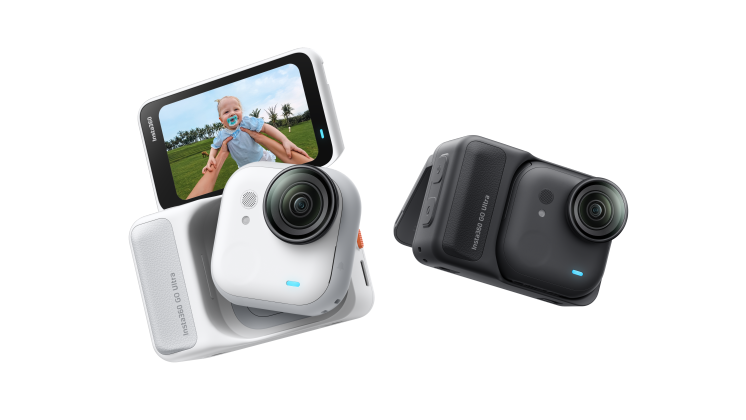
The upgraded battery allows you to shoot for up to 200 minutes on a single charge, so your adventures don’t have to stop just because your camera does. It's ultra-fast when it’s time to recharge, so you can get back into the action as soon as possible.
Where will your adventure take you? Underwater? On a bike? GO Ultra is ready to go, too. And where other vlogging cameras struggle with audio, GO Ultra uses specialized AI algorithms to clarify sound and minimize background noise so you come in loud and clear on your channel.
Other features, such as Clarity Zoom, PureVideo Mode for low-light shots, and 4K60fps video, make the final results just as impressive as the user experience.
Insta360 GO 3S: For Clip-On Versatility in a Tiny But Mighty Package
Tiny, but mighty. This 1.4oz vlogging camera clips on just about anywhere and disappears until you need it. Attach it to your dog’s collar, baseball cap, or get that weird, down-low angle you couldn’t contort your body to reach. The 2.2” flip touchscreen is easy to pop up to check your frame, then folds away once you’re ready to go.
The 4K recording includes stabilization features, a MegaView FOV for ultra-wide shots without distortion that distracts from the story you’re telling, and creative modes like TimeShift, timelapse and slow-mo at 200fps.
You can start your recording instantly with the touch of a button on the front camera, even if it’s off). Even easier are the voice and gesture controls, simply speak or hold up your hand to start and stop recording.
Clip it, forget it, and let GO 3S capture all your adventures with hands-free ease. The 140-minute battery life keeps going, and even when it’s time to charge, you can still shoot simultaneously.
Which Flip Screen Vlogging Camera Is Right for You?
| Feature | Insta360 Ace Pro 2 | Insta360 GO Ultra | Insta360 GO 3S |
| Max Resolution | 4K60fps | 4K60fps | 4K30fps |
| Flip Screen Type | 2.5” flip touchscreen | 2.5” flip touchscreen | 2.2” flip touchscreen |
| Image Stabilization | FlowState Stabilization and 360 Horizon Lock | FlowState Stabilization and 360 Horizon Lock | FlowState Stabilization and 360 Horizon Lock |
| Field of View | 157º | 156º | 150º |
| Chip | Pro Imaging Chip + 5nm AI Chip | 5nm Chip | 14nm AI chip |
What Are the Benefits of Choosing a Vlogging Camera With a Flip Screen?
Are you convinced your old digital camera is good enough to support your vlogging hobby, side gig, or career? It’s worth upgrading to a better vlogging-specific camera with a flip screen—promise. Here’s how you’ll benefit.
Easier Framing and Composition
Eliminate the need to run back and forth from your tripod to check the shot or the worry that comes with hoping you got the right frame and composition without seeing it yourself. Authentic vlogging is in the moment and becomes more genuine when you’re simply living life as the camera follows. You don’t have to waste time framing the camera and can know that you’re capturing what you want.
Real Time Adjustments
If you don’t like how things look, you can adjust as you go and avoid the frustration of viewing footage back only to realize you missed the best parts or filmed at the completely wrong angle the entire time. Live in the moment, adjust in the moment—be in the moment.
Shooting Angle Versatility
Want to shoot from the floor and get a cool upward angle? Want to attach the camera to a gate or wall for the perfect composition? Don’t worry about lying down on the pavement or twisting your body into an unnatural position to achieve your desired shooting angle. The screen can simply flip around so you can make any position work.
Convenience
Bottom line? It’s easier. A flip screen works for you, not the other way around. It’s designed with the vlogger and the subject in mind—because, in most cases, both are you.
5 Tips for Using a Digital Camera With a Flip Screen
If you’re new to using a digital camera with a flip screen or want to improve your handling of this type of equipment, use these tips to become more comfortable with the process and impressed with the results.
- Look at the lens, not the screen
It can be both confusing and tempting to have both the lens and your screen in front of you. At the end of the day, viewers will watch the footage and want to feel connected to you, so you can think of them as living inside the lens.
If you’re just getting started as a vlogger, remember to keep your focus on the lens and only check the screen when framing a shot or verifying your progress. Looking just off-center rather than directly at the camera can be distracting for viewers.
- Check your frame before recording
That moment or two just before you press record is the perfect time to check your frame and ensure your shot is aligned with your vision. This will minimize the time you spend looking at the screen while the camera is rolling and start you off on the right foot for the perfect shot.
- Protect the screen
When flipped out, the screen makes your camera a bit larger, making it more vulnerable to catching or hitting things as you live out your adventures. Protect the screen by flipping it back down when you’re not using it, and remember to give more clearance for it when flipped up.
- Experiment with angles
Use the screen to your advantage and try unusual angles that you might not be confident in if you can’t see what the shot looks like. Try down-low angles, up-high shots or even setups in unexpected places, like the crook of a tree branch, the inside of your mailbox or the POV of your doorbell.
- Use it for hands-free shots
Go hands-free and attach the camera to yourself so that your subjects can see themselves on camera, or set it up somewhere and move backward into the shot for a wide perspective. Seeing what you’re filming gives you the freedom and flexibility to do what you want in front of the camera while maintaining back-end control.

Frequently Asked Questions
What Is It Called When a Camera Has a Flip Screen?
A camera with a flip screen is mainly referred to as a “flip screen camera.” This type of screen, which can also be called an articulating screen, can pivot forward and back to show the screen to the lens side of the camera so that the subject can also view the shot.
Why Is a Flip Screen Useful for Vlogging?
A flip screen is handy for vlogging because the vlogger and subject are often the same thing. Without someone else behind the camera, it’s hard to know if you’re in the frame or if the composition looks good. Flip screens, especially those with touch capabilities like those on Insta360 models, add convenience and control.
Which Cameras Have Flip Screens?
Vlogging cameras are some of the most common cameras with flip screens included. Some camcorders may also have flip screens, and modern digital cameras can be fitted with flip screen attachments so the subject can see what the shot looks like.
Vlogging Cameras With Flip Screens Enhance Content Creation
Vlogging cameras are designed with the goals of great content and ease of use in mind. A flip screen is a must-have feature for vloggers who want to film in the moment without too much fumbling or frustration, as it allows them to be both behind the camera and in front of the camera without having to choose.
Vloggers who want to take their content to the next level should consider the equipment they use. A vlogging camera with a flip touchscreen, like Insta360 Ace Pro 2, or separate Action Pods like GO Ultra and GO 3S, are perfect for everyday shooters with high standards for quality and convenience.
Keen to keep up to date on Insta360 stories? Keep an eye on our blog and sign up for our mailing list. Got a story to share? Email yours to communitystories@insta360.com and win up to US$50.







%20(1).svg)


%20(1).svg)

.svg)


