
















































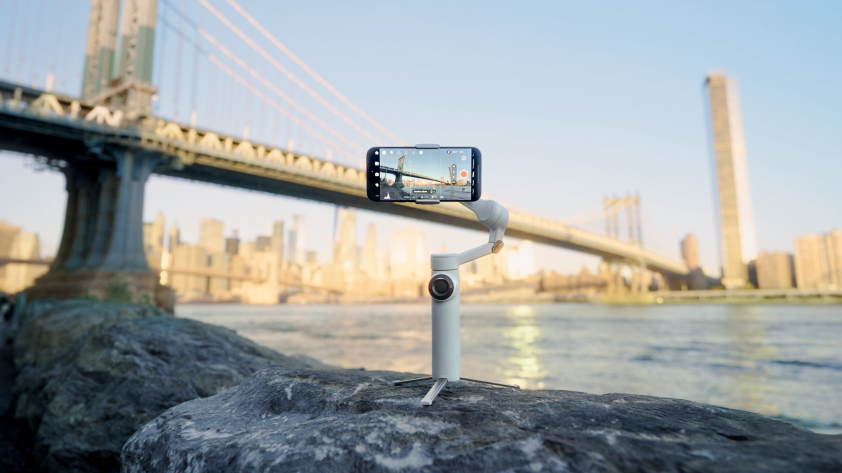


Meet Insta360 Flow 2 Pro, the brand’s most advanced smartphone gimbal yet.
Your first question might be: How does it compare with others? Is it really that smart and smooth?
Our Flow series is built to keep creators in motion and action always rolling. Whether you're a seasoned pro using Deep Track 4.0, tinkering with its Apple DockKit magic, or simply setting it up for the first time, this FAQ covers everything you need to know to shoot like a professional.
Getting Started & Setup
What’s Included in the Insta360 Flow 2 Pro Box?
Inside the Insta360 Flow 2 Pro box, you’ll find the gimbal itself, a magnetic phone clamp, a protective grip cover, a USB-C charging cable and a soft storage pouch. Depending on your region or bundle, you might also get a wrist strap or additional accessories designed for travel or professional setups.
How Do I Set Up and Pair Insta360 Flow 2 Pro?
Even if you're brand new to gimbal technology, you can move from unboxing to shooting in minutes. Start by unfolding the gimbal arm until it locks into place. Then, snap your phone into the magnetic clamp and power on the gimbal by holding the trigger.
Next, open the Insta360 app and follow the prompts to connect via Bluetooth. Once paired, you can calibrate the gimbal with a quick on-screen guide. From there, you’re good to go. Don't worry about fiddling with settings or making adjustments in the early stage. Insta360 Flow 2 Pro automatically recognizes your phone’s orientation and adjusts balance instantly, so start shooting and let the magic commence.
Which Phones Are Compatible With the Insta360 Flow 2 Pro?
Insta360 Flow 2 Pro works with most modern iOS and Android smartphones that fit within the clamp’s width range. iPhone users get an extra advantage thanks to Apple DockKit support, and the Insta360 Flow 2 Pro's ability to integrate directly with iOS Camera apps for seamless native tracking across FaceTime, Zoom, and TikTok.
Android user? There's no need to feel left out. The Insta360 app allows users to access full gimbal features, including gesture control, Deep Track 4.0, and AI-powered framing. Whichever side of the smartphone divide you reside on, setup is easy and the results are exceptional.
Hardware & Design
What’s New Compared to the Original Flow?
The original Insta360 Flow launched in 2023 and was a huge success, but the Insta360 Flow 2 Pro takes things up several notches. The flagship upgrade is Deep Track 4.0, Insta360’s most advanced AI tracking system yet, offering faster subject recognition and smoother re-centering even when obstacles get in the way.
It’s also the first gimbal to support Apple DockKit, which brings native iPhone tracking straight into the stock Camera app, FaceTime, and social platforms like TikTok and Zoom. Add stronger motor torque, refined ergonomics and a bigger battery, and you’ve got a stabilizer that’s both more powerful and more intuitive to use.
How Does the Built-In Selfie Stick and Tripod Work?
Like the original Insta360 Flow, Insta360 Flow 2 Pro has a few tricks up its sleek sleeve. The built-in selfie stick extends telescopically, perfect for wide shots, vlogging or dynamic movement. The integrated tripod folds out from the base, turning any flat surface into an instant filming setup. No extra gear needed, no extra weight in that pack of yours—with the Insta360 Flow 2 Pro, everything's included.
Battery & Charging
How Long Does the Insta360 Flow 2 Pro Battery Last?
Is there anything worse than the blinking red light of battery death just as the action peaks? The good news is that Insta360 Flow 2 Pro is built for all-day shoots, and on a full charge, you’ll get up to 10-12 hours of use, depending on your shooting style, connected phone and tracking intensity. Even with continuous use, it’s rare to need a midday top-up. When you do, charging is fast and easy. Plug it in via USB-C, and Insta360 Flow 2 Pro can recharge from 0 to 100% in about two hours.
Can Insta360 Flow 2 Pro Charge My Phone While in Use?
You bet. One of Insta360 Flow 2 Pro’s most convenient upgrades is reverse charging, which allows you to plug your phone directly into the gimbal’s USB-C output for reverse charging, powering it up while recording. This is ideal for long sessions like live streams, time lapses or event coverage when battery life matters most. Obviously, this will affect overall battery life, but it’s a lifesaver in those much-needed battery emergencies.
Tracking & Stabilization
What Is Deep Track 4.0, and How Does It Improve Tracking?
Deep Track 4.0 is Insta360’s next-generation AI tracking system designed to keep your subject perfectly framed, no matter how unpredictable the movement. Whether you're filming a dog zig-zagging through a park or a group of dancers, Insta360 Flow 2 Pro locks on with speed and precision so you don't miss a twist or a turn.
It’s smarter than ever, recognizing faces, bodies and even objects with improved re-acquisition. If your subject briefly leaves the frame, Deep Track 4.0 knows what to do when they re-enter. The new algorithm also smooths out transitions and zoom adjustments automatically, so your footage feels more dynamic and cinematic without constant manual control.
How Does Apple DockKit Enhance iPhone Tracking?
Insta360 Flow 2 Pro takes iPhone tracking to a whole new level with Apple DockKit Integration. Unlike traditional Bluetooth-based gimbals, Apple DockKit lets your iPhone control tracking natively, no app switching or extra pairing required.
That means you can use your gimbal directly inside the iOS Camera app, FaceTime, Zoom, or social platforms like TikTok, and Insta360 Flow 2 Pro will still track you smoothly and automatically. It’s the ultimate plug-and-play experience for creators, streamers, and anyone who films on the fly.
Controls & Features
What Gestures and Voice Controls Does the Insta360 Flow 2 Pro Support?
Touching a button feels so 2024, and with Gesture Control, you can start recording or trigger tracking with a simple wave. Raise your hand to activate tracking, and show an open palm to stop—it’s that easy. Prefer talking over waving? Voice control has you covered. Just say “Start recording” or “Stop recording,” and the gimbal obeys instantly.
How Do Pro Framing and the Selfie Mirror Improve Shooting?
Pro Framing is your built-in director. It automatically adjusts framing based on your subject’s movement, keeping you perfectly centered whether you’re standing still or walking. If you need to switch between landscape and portrait quickly, the Insta360 Flow 2 Pro recalibrates in seconds.
Then there’s the selfie mirror—a simple yet genius feature that lets you line up shots without relying on your phone’s preview. It’s perfect for vloggers and creators who like to stay front and center while using rear cameras for better image quality.
Mounting & Accessories
How Does the Magnetic Phone Clamp Work, and Is It Secure?
The magnetic phone clamp is one of Insta360 Flow 2 Pro’s signature features, and it’s surprisingly strong. Simply snap your phone into the clamp, align it with the gimbal arm, and the powerful magnet locks it in place instantly. It’s engineered to hold steady even through rapid movement, tilts or spins, so your phone stays secure no matter how intense the action gets.
App & Editing
Do I Need the Insta360 App?
Insta360 Flow 2 Pro works seamlessly with the Insta360 app, but the choice is yours. You're not locked into one app, and iPhone users can use the gimbal’s tracking and stabilization features directly inside native apps like the iOS Camera, FaceTime, TikTok and Zoom.
That being said, if you want complete creative control, the Insta360 app is where the magic happens. It unlocks Gesture Control and voice controls, Deep Track 4.0 and AI-powered shooting tools like Shot Genie and Auto Framing.
What Editing Tools Are Available in the App?
The Insta360 app turns your phone into a mini editing studio. Once your footage imports, the AI Edit tool automatically identifies highlights and builds a polished video—complete with transitions, effects, and music. If you're a do-it-yourself kind of person, you can use manual keyframes, speed ramping, or reframing tools to craft your story exactly how you want it. You can also export in any aspect ratio, such as 16:9 for YouTube, 9:16 for Reels, or 1:1 for Instagram. Basically, whatever you need, the Insta360 app has you covered.
Limitations & Considerations
What Are the Main Differences for iPhone vs. Android Users?
Both iPhone and Android users get the same world-class stabilization, smooth tracking and ergonomic design—but a few small differences are worth noting.
For iPhone Users: Insta360 Flow 2 Pro integrates directly with the Apple DockKit framework, meaning you can enjoy fully native tracking across apps like FaceTime, TikTok and Zoom—no Insta360 app required. Thanks to Apple's deep hardware integration, you also get faster reconnection and slightly tighter app-level control.
For Android Users: The Insta360 app offers all major features, including Deep Track 4.0, Gesture Control and AI-powered framing. However, Apple DockKit tracking is exclusive to iOS devices, so Android users will need the app open to access full features. Android users can also consider the AI Tracker accessory with built-in Spotlight for tracking on any phone in any app.
Whether you're Team Apple or Team Android, Insta360 Flow 2 Pro delivers rock-solid performance, excellent stabilization and one of the most intuitive mobile filmmaking experiences on the market.
Keen to keep up to date on Insta360 stories? Keep an eye on our blog and sign up for our mailing list. Got a story to share? Email yours to communitystories@insta360.com and win up to US$50.






%20(1).svg)


%20(1).svg)

.svg)


