



















































Luna Ultra, Insta360's flagship 8K gimbal camera, hit shelves on June 10 and quickly made an impression. Alongside standout features like a Detachable 2" OLED Touchscreen, 8K Dolby Vision video, and a dual-lens setup with a dedicated telephoto lens, one feature has generated especially strong interest: 10-bit I-Log.
It's a feature creators have been asking Insta360 for years. But what exactly is 10-bit I-Log, how does it work, and does it actually matter for your workflow? Let's break it down.
What is 10-bit Color?
10-bit color refers to how much color information a camera can capture in each frame.
In simple terms, it means the camera can record far more shades of color and brightness compared to standard 8-bit footage. An 8-bit video file can display around 16.7 million colors. 10-bit increases that dramatically to over 1 billion colors.
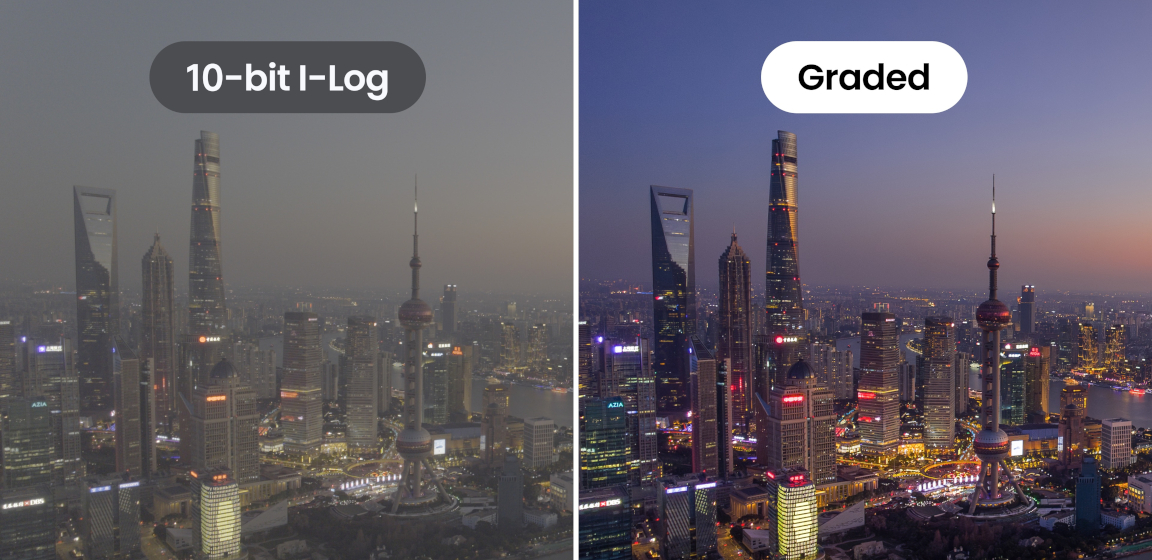
On Luna Ultra, 10-bit recording is paired with I-Log, a flat color profile designed to preserve more image information for post-production workflows. Together, 10-bit I-Log can unlock up to 14 stops of dynamic range, helping preserve more detail in both shadows and highlights.
For professional creators, this additional color and tonal information provides greater control during color grading. Editors can make more precise adjustments to exposure, contrast, white balance, and color while maintaining image quality. Whether matching footage across multiple cameras or creating a specific cinematic look, 10-bit I-Log offers a more flexible and professional workflow.
That extra color and tonal data helps create smoother transitions between tones, especially in areas like:
- Blue skies
- Sunsets
- Skin tones
- Shadows
- Bright highlights
For creators, this means footage can look more natural, more detailed, and more flexible during editing.
8-bit vs 10-bit
Here's the easiest way to think about it:
8-bit is excellent for quick sharing and everyday shooting. It delivers vibrant footage straight out of the camera and works well for most casual content creation.
10-bit builds on that foundation by capturing significantly more color information, giving creators more room to push their footage further in post-production.
The key differences
| 10-bit | 8-bit | |
| File Size | Larger, more detailed files | Smaller file sizes |
| Workflow | Designed for advanced editing workflows | Great for ready-to-share footage |
| Color Flexibility | Greater grading flexibility | Strong color performance |
| Editing | More tonal and color information | Easier on storage and processing |
| Ideal For | Cinematic productions and advanced workflows | Everyday creators |
One area where the difference becomes especially noticeable is color grading.
With 8-bit footage, making aggressive edits to exposure, contrast, or color can sometimes introduce issues like:
- Banding in skies or gradients
- Loss of detail in highlights and shadows
- Less natural color transitions
10-bit footage retains more information, helping preserve smoother results even after heavier edits.
That said, 8-bit is still more than capable for a huge range of content. Many action cameras and consumer devices continue to use 8-bit because it offers an excellent balance of quality, performance, and efficiency.
Professional Color Grading Workflows
For creators working in professional production environments, Luna Ultra's 10-bit I-Log footage integrates seamlessly into advanced post production workflows.
Luna Ultra supports industry-standard ACES workflows and is compatible with DaVinci Resolve, making it easier to incorporate footage into professional editing and color grading pipelines. Insta360 also provides official color recovery files, allowing creators to quickly transform flat I-Log footage into a balanced starting point for further grading.
This makes it easier to maintain consistent color across projects, match footage from other professional cameras, and create a polished final look with greater precision.
Combined with up to 14 stops of dynamic range, Luna Ultra gives creators significantly more flexibility when refining highlights, shadows, and color tones during post-production.
Professional Resources for 10-Bit I-Log
Ready to start grading your footage?
Insta360 10-Bit I-Log LUTs
Download official LUTs designed for Insta360 10-bit I-Log footage, with support for multiple output color spaces.
Academy Color Encoding System (ACES) Setup & Reference Guide
Access configuration files and documentation for integrating Insta360 I-Log 10-bit footage into ACES color-managed workflows.
Both resources and more are available from the Insta360 Download Center.
A Simpler Way to Shoot Log
Traditionally, Log footage is designed for post production and often appears flat and desaturated straight out of the camera. While this provides maximum editing flexibility, it can also create a steeper learning curve for newer creators.
Luna Ultra simplifies this process. Unlike many cameras that require extensive grading after shooting, Luna Ultra allows creators to apply cinematic filters directly while shooting in 10-bit I-Log mode.
This means users can enjoy the flexibility and dynamic range benefits of Log recording while still achieving a polished, cinematic look straight from the camera.
For beginners, it's an easy way to explore the benefits of Log shooting without needing advanced color grading knowledge. For experienced creators, it provides a faster workflow when a quick turnaround is required.
Why 10-bit Matters
10-bit gives creators more creative freedom.
Instead of locking in the final look while shooting, creators have more flexibility to refine colors, recover details, and shape the final image during editing.
This becomes especially valuable in challenging scenes, such as:
- High-contrast lighting
- Night scenes
- Sunrises and sunsets
- Mixed indoor and outdoor lighting
For creators shooting professionally, or anyone aiming for a more cinematic look, 10-bit provides greater control over the final image. With Luna Ultra, 10-bit I-Log helps unlock:
- Richer color reproduction
- Up to 14 stops of dynamic range
- More natural tonal transitions
- Enhanced post production flexibility
Importantly, 10-bit isn't only for professional filmmakers. With Luna Ultra's built-in creative tools and cinematic filters available in I-Log mode, even creators who are new to color grading can achieve more cinematic-looking footage with minimal editing.
.gif)
Beginners can simply select a preferred look and start shooting, while more experienced creators can take advantage of the full 10-bit I-Log file for advanced grading and creative adjustments later.
The result is footage that looks cleaner, more refined, and more immersive.
Who Benefits Most From 10-bit?
10-bit I-Log is particularly useful for:
- Professional filmmakers
- Commercial productions
- Content creators who color grade their footage
- Travel filmmakers shooting in challenging lighting conditions
- Anyone looking for a more cinematic look
- Beginners who want access to cinematic filters and future-proof footage
- Creators who want maximum image quality and editing flexibility

If you mainly shoot quick clips for social media with minimal editing, 8-bit may already deliver everything you need. But if you want maximum flexibility and image quality from your footage, 10-bit opens up far more creative possibilities.
Final Thoughts
10-bit I-Log is one of the biggest upgrades for creators who care about image quality and post-production flexibility.
While 8-bit remains a strong and practical format for everyday shooting, 10-bit I-Log gives creators more room to push their footage creatively without sacrificing image integrity.
With Luna Ultra, creators can choose the workflow that suits them best. Professionals gain access to a powerful 10-bit I-Log format with support for ACES workflows, DaVinci Resolve, and official color recovery files for advanced grading. At the same time, beginners can take advantage of built-in cinematic filters in I-Log mode to create polished, cinematic footage straight from the camera.
Whether you're delivering a commercial project or creating content for social media, Luna Ultra's 10-bit I-Log workflow offers more creative freedom, greater image quality, and a clearer path to cinematic results.
FAQ
"8-bit is great when you want fast, ready-to-share footage. 10-bit is where creators get more freedom to shape the final image."
- Does 10-bit affect file size?
Yes. Because 10-bit captures more color information, files are typically larger than 8-bit footage. This can require:
- More storage space
- Faster memory cards
- More powerful editing hardware
The benefit is greater flexibility and image quality during editing.
- Do I need 10-bit if I don't color grade?
Not necessarily. 8-bit still delivers excellent results for everyday shooting, quick edits, and social media content. 10-bit becomes more valuable when you want: - More control over colors - A cinematic look - Heavy editing flexibility - Better results in challenging lighting
- Can you see the difference between 8-bit and 10-bit?
In some scenes, yes. The difference is often most noticeable in:
- Skies and sunsets
- Skin tones
- Low light scenes
- High contrast environments
- Footage with heavy color grading
10-bit can help reduce visible banding and produce smoother tonal transitions.
- Is 10-bit only for professionals?
No. Professional creators benefit most from the added flexibility, but anyone interested in improving image quality or learning color grading can take advantage of 10-bit recording.
- Does 10-bit improve dynamic range?
10-bit itself does not directly increase dynamic range, but it helps preserve more color and tonal information across the image. When combined with advanced imaging systems and log profiles, this can help creators make better use of the available dynamic range during editing.
- Why is 10-bit important for Log shooting?
Log profiles are designed to preserve more image information for post-production. Because 10-bit captures significantly more color data than 8-bit, it provides a much stronger foundation for color grading and tonal adjustments when shooting in Log.
Keen to keep up to date on Insta360 stories? Keep an eye on our blog and sign up for our mailing list. Got a story to share? Email yours to communitystories@insta360.com and win up to US$50.
Your shot. Your world. The Insta360 Global Awards 2026 supported by Leica are officially open. Join creators worldwide and compete across six categories (Street, Travel, Life, Portrait, Sports, and Night) for your share of a US$150,000+ prize pool, including cash prizes and Insta360 gear. Submit your best video or photo at insta360.com/awards.







%20(1).svg)


%20(1).svg)

.svg)


