



















































As SMB teams grow and embrace hybrid work, choosing the right workspace solutions becomes essential to keeping collaboration efficient and scalable. Tools that worked for a small startup — scattered messaging apps, legacy conferencing devices, and ad-hoc meetings — often struggle to handle surging business demands or support larger teams working across offices and remote locations.
The challenge isn't just choosing more tools, but building a structured collaborative workspace where communication, documents, meetings, and access management work together smoothly.
In this article, we'll explore how SMBs can build modern workspace solutions that better support hybrid work, from choosing the right cloud collaboration platforms to simplifying access with SSO and upgrading meeting rooms for hybrid teams.
Key takeaways:
- How to choose the right collaboration platform for SMB teams
- How cloud tools and SSO simplify collaboration and security
- How to upgrade meeting spaces to support hybrid work
Start With a Unified Collaboration Platform
One of the biggest productivity drains in growing organizations is tool fragmentation. Zoom's 2025 workplace collaboration data shows that employees using more than ten workplace apps report communication issues at a higher rate than those using five or fewer. Jumping across platforms can create message gaps and slow down decision-making, with a higher risk to information security.
To address this, many SMB IT leaders consolidate their workflows around a unified collaboration platform, like Google Workspace, Zoom Workspace, or Microsoft 365, to eliminate fragmentation by keeping chat, files, video meetings, and real-time document collaboration in one system. The benefits go beyond convenience:
- Context continuity: Chat, meetings, and documents link natively, reducing lost information.
- Less switching: Employees avoid toggling between multiple apps and interfaces.
- Smarter use of AI tools: Automation and copilots can access consistent data across workstreams.
For fast-growing companies, this consolidation delivers measurable returns in productivity and governance and support for hybrid work. Here's a high-level comparison of the three platforms from the perspective of IT professionals choosing a collaboration solution for SMBs:
| Platform | Microsoft 365 | Google Workspace | Zoom Workspace |
| Best for company size | Medium to large SMBs/enterprises | Small to mid-sized SMBs/distributed teams | All sizes (fit for meeting-centric teams) |
| Core strength | Full office ecosystem (Teams, Outlook, OneDrive, SharePoint) | Simple, intuitive collaboration (Google Drive, Docs, Calendar and Meet) | Leading video conferencing experience, especially the intelligent director |
| Deployment complexity | Medium (requires AD/SSO integration) | Low (cloud-based, simple setup) | Low (meeting-centric) |
| Cost | Medium-high (per-user licensing) | Medium-low (per-user licensing) | Varies by meeting scale + add-ons |
| Migrating difficulty | Medium (integration with existing MS ecosystem easy; migration from other systems requires planning) | Low (mature migration tools) | Low–High (depends on file/email ecosystem integration) |
| Cloud infrastructure | Strong (OneDrive + Azure ecosystem) | Strong (Google Cloud ecosystem) | Strong (Zoom Cloud services) |
| Meeting collaboration | Teams: HD audio/video, calendar integration | Meet: tightly integrated with Calendar | Industry-leading video conferencing |
| Cloud collaboration | Strong (native Office apps) | Strong ( Google Docs, Sheets, Slides) | Basic (requires third-party integration) |
| AI agents in Workflows | Copilot | Gemini | Zoom AI |
Simply put, Microsoft 365 suits mid-to-large teams needing full Office tools, security, and compliance. Google Workspace works best for small, cloud-first teams seeking real-time collaboration and simple setup. Zoom Workspace is ideal for meeting-focused teams of any size, offering excellent video and audio quality with minimal deployment.
Aligning platform choice with your team size, hybrid work needs, and existing IT systems ensures your workspace solutions scale effectively without overspending.

Upgrade Meeting Infrastructure for Hybrid Work
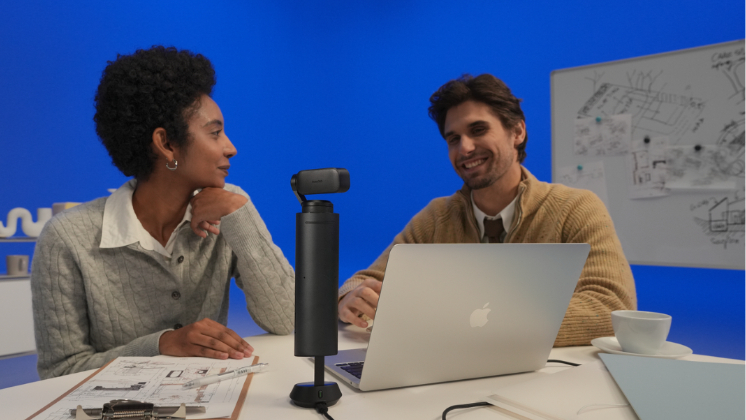
Collaboration software often gets the spotlight, but meeting hardware is overlooked. Many SMBs still rely on laptop webcams and earbud microphones, which are ill-suited for hybrid collaboration. To close this gap, more SMBs are investing in meeting-room workspace solutions that improve the experience of hybrid work for both in-office and remote participants.
Upgrading to dedicated conferencing devices designed for small to mid-sized conference rooms or open spaces, like the Insta360 Wave speakerphone or Connect video bar, elevates workspace efficiency. With reliable voice pickup range, high audio quality, and AI meeting assistant support, these collaboration tools help remote teams see and hear clearly, boosting their "digital identity" to clients and their trust in business negotiations.
Solutions like Insta360 Connect combine speaker tracking, AI noise cancellation, and 4K dual-camera imaging quality into an all-in-one system. With easy plug-and-play use and an intuitive touch panel experience, this BYOD setup is simple to deploy, operate, and manage.
For SMB teams, especially those working in rented meeting spaces, all-in-one Android collaboration bars are a flexible and cost-effective choice. For smaller teams such as SOHOs, high-quality 4K webcams are also essential conferencing tools. Insta360 Link 2 Pro delivers studio-level image quality, clear directional audio, and intelligent workflow controls in a compact, desktop-ready design. Paired with Insta360 Wave, it gives teams a complete video and audio setup in one streamlined package.
Simplify Access With Identity and SSO
As the application footprint expands, managing credentials becomes a scaling issue — both for IT and users. Verizon's 2025 Data Breach Investigations Report found that 49% of SMB breaches stemmed from compromised or reused credentials.
Implementing Single Sign-On (SSO) through providers such as Microsoft Entra ID or Okta helps reduce that risk by linking all applications under one authentication layer. The advantages are significant:
- Streamlined onboarding and offboarding with centralized control
- Consistent access policies across all business apps
- Lower password fatigue and fewer helpdesk tickets
- Improved compliance and audit tracking
SSO also supports role-based access control (RBAC), ensuring every employee has the right level of access while minimizing exposure. Adding multi-factor authentication, automated provisioning, and regular audits further strengthens security while keeping workflows seamless.
Automate Collaboration Workflows
When SMB operations expand, manual workflows quickly become a bottleneck. Common high-impact automations include:
- Auto-provisioning and deprovisioning users across systems
- Syncing permissions and access levels between productivity tools
- Generating meeting summaries or task items automatically using AI assistants
Automation is a key part of modern workspace solutions because it reduces manual overhead and helps teams adapt more easily to hybrid work operations. The most effective collaboration ecosystems rely on stable integrations and well-documented APIs, enabling tools to scale as the organization grows.
For example, consolidating meeting summaries across local and cloud storage can be complex without centralized access control. Solutions like Insta360 Wave for Business support local deployment and provide open APIs, allowing secure integration with enterprise systems while meeting stringent security requirements in finance, government, and other regulated industries.
Ready to Build a Workspace That Scales?
A scalable collaboration strategy isn't about stacking tools — it's about designing a connected system that evolves with business growth. A well-structured modern SMB workspace includes:
- A unified platform (Microsoft 365 or Google Workspace)
- Centralized identity and SSO management
- Cloud-based, real-time document collaboration
- Professional hybrid meeting systems, including reliable conferencing devices
- Connected workflows through automation and APIs
When these layers function cohesively, teams communicate faster, make decisions with better context, and maintain stronger security postures. As hybrid work evolves, a well-architected collaboration environment is a competitive advantage for businesses ready to scale efficiently.
Assess your current setup, explore smart collaboration hardware, and give your SMB the systems it needs in a hybrid work future. Discover your workspace solutions with Insta360 Conferencing or contact us by email at conferencing@insta360.com for specialist support, product updates, discounts, and practical insights.
Keen to keep up to date on Insta360 stories? Keep an eye on our blog and sign up for our mailing list. You can also contact our Enterprise team directly to see how 360 cameras can benefit your business







%20(1).svg)


%20(1).svg)

.svg)


