










































How do I check the Serial Number of my GO?
-
-
1. Connect your camera to the app via charge case first. Then go to the app's sign-up page. The Serial Number will be recognized automatically.
2. You can also check the bottom of the box your camera came in. You will find the Serial Number attached.
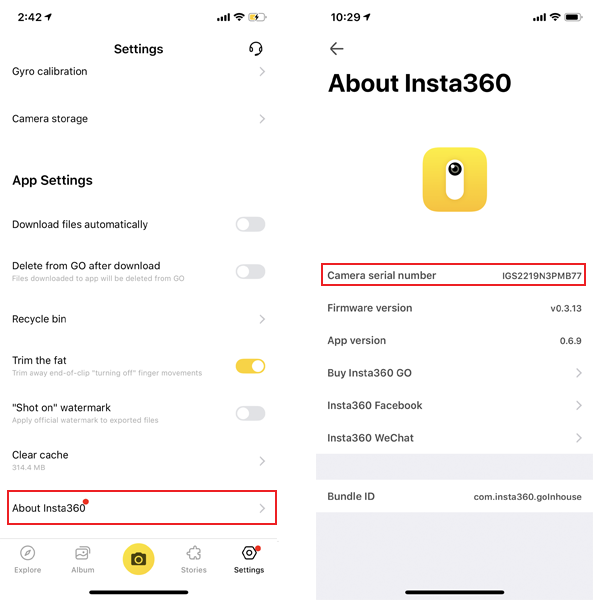
3. After connection, You can also go to the Settings->About Insta360 to check the serial number.
-
1. Connect your camera to the app via charge case first. Then go to the app's sign-up page. The Serial Number will be recognized automatically.
2. You can also check the bottom of the box your camera came in. You will find the Serial Number attached.
3. After connection, You can also go to the Settings->About Insta360 to check the serial number.
Was this information helpful?
.svg)


Insta360 Trade-In
Tirez profit du matériel que vous n'utilisez plus.
En savoir plus
Souscrire
Recevez les dernières nouvelles d'Insta360

J'accepte la politique de confidentialité et je souhaite recevoir les dernières nouvelles et offres d'Insta360 par email. Je comprends que je peux contacter Insta360 pour me désabonner à tout moment.


%20(1).svg)


%20(1).svg)

.svg)


Assistance à l'achat
Questions avant-vente
Commandes & Paiement
Retours & Remboursements
 Heures de bureau: 9:00-18:00 (UTC+1)
Assistance produit
Dépannage & Aide
Réparations & Garantie
Heures de bureau: 9:00-18:00 (UTC+1)
