
















































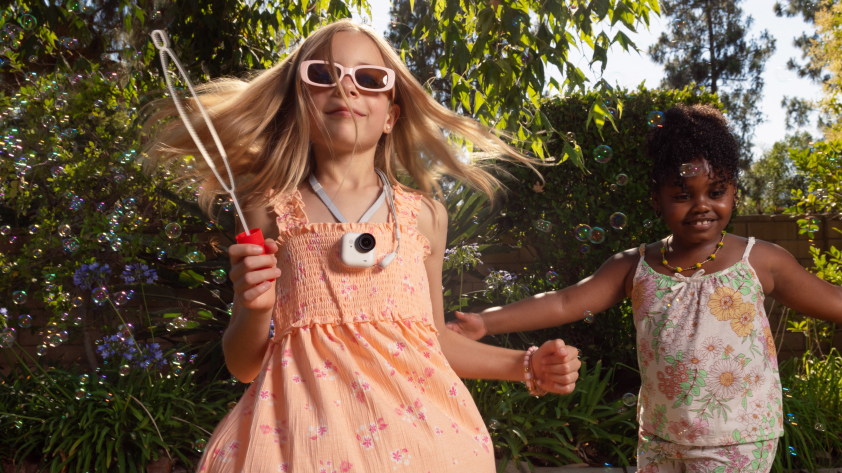


What fits comfortably in the palm of your hand, weighs the same as a large egg and delivers knock-out video quality? Insta360 GO Ultra isn’t just the newest addition to the action cam family, it’s a rethink of what a tiny camera can do.
Small. Powerful. Unstoppable. For those who live fast and film at speed, Insta360 GO Ultra combines pro-level performance with the kind of grab-and-go freedom that was previously impossible.
Stick it on your cap, mount it on your bike or fix it to your board. Wherever it goes, extraordinary footage is sure to follow. In this guide, we'll break down everything you need to know to get started, from first setup to fine-tuning every frame.
Getting Started & Setup
What’s Included in the Insta360 GO Ultra Bundle?
Action-ready kit that's ready in minutes. Inside a standard Insta360 GO Ultra bundle, you’ll find the camera itself, the Action Pod, a Magnet Pendant, a Pivot Stand, and magnetic Easy Clip. You'll also get a charging cable. Each of these plays a distinct function, allowing you to film in a different way. The pendant keeps the camera locked to your chest for hands-free capture, while the pivot stand sticks to nearly any surface for dynamic angles.
How Do I Activate and Connect Insta360 GO Ultra With the App?
The fastest way to start shooting is to sync Insta360 GO Ultra with the Insta360 app. Power on the camera, open the app and follow the quick on-screen prompts to connect via Bluetooth or Wi-Fi.
Once linked, you’ll have full access to your footage, firmware updates and AI editing tools. No cables, no hassle. Just connect and create!
How Do I Control Insta360 GO Ultra With or Without the Action Pod?
When docked in the Action Pod, use the touchscreen for framing, playback and instant control. Pop it out and Insta360 GO Ultra becomes an ultra-light, wearable camera you can run, ride or climb with.
Off-pod control is simple; just use QuickCapture to start recording instantly (press the Button on the camera once) or activate voice control when your hands are busy.
Hardware & Design
How Does the Action Pod Touchscreen and Locking System Work?
The Action Pod is designed with simplicity in mind. The magnetic locking system snaps Insta360 GO Ultra into place with a satisfying click, and yes, it's secure enough for mountain descents and every bump and roll that comes with it, yet quick enough to swap angles mid-shoot.
Its touchscreen interface mirrors what’s on your phone, giving you instant control over modes, playback and framing.
Does Insta360 GO Ultra Use MicroSD Cards and What’s the Max Capacity?
Insta360 GO Ultra records to a microSD card in the Action Pod, up to 1TB. Once you’re done shooting, simply transfer your clips to your phone or computer using the Insta360 app or the included cable.
Battery & Charging
How Long Does the Battery Last and How Fast Can It Charge?
Insta360 GO Ultra may be small, but its battery endurance is built for long days and big sessions. On its own, the camera powers through up to 70 minutes of continuous recording, but snap it into the Action Pod and you’ll get around 200 minutes total—plenty for a morning surf, trail run or city shoot.
Charging is just as streamlined. Insta360 GO Ultra refuels rapidly through the Action Pod’s charging cradle or via USB-C, reaching 80% in about 12 minutes. Now that’s quick!
Waterproofing & Protection
Is Insta360 GO Ultra Waterproof and What Are the Limits?
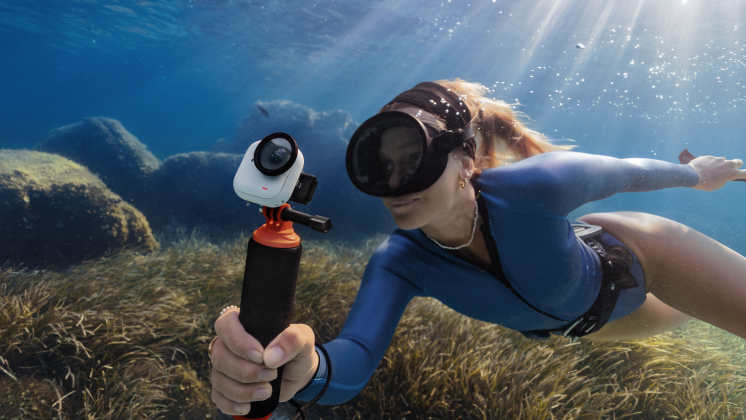
This is not a camera you need to shelter when the elements rage around you. Rain, surf, snow—Insta360 GO Ultra doesn’t flinch one bit.
The camera itself is rated IPX8 waterproof up to 33ft (10m) straight out of the box. That means you can dive, paddle or take a rainy hike without a case. Dock it in the Action Pod and you’ll get IPX4 splash resistance, ideal for light rain or mist but not full submersion. If you’re planning deep-water adventures, use the Dive Case accessory for maximum protection.
Video & Photo Modes
What Resolutions and Frame Rates Can I Shoot With Insta360 GO Ultra?
Speed, smoothness or cinematic depth, it’s all here. Insta360 GO Ultra shoots up to 4K60fps for crisp, action-ready footage, 4K30fps for balanced detail and battery life and 2.7K240fps for slow motion that turns every splash or spin into art. Whatever you need to film, and in whatever level of detail, you'll find it all in one little box.
What’s FreeFrame Video and When Should I Use It?
FreeFrame Video gives you ultimate freedom after the shoot. Instead of locking in a horizontal or vertical format, you can reframe later in the Insta360 app. If you're working across numerous social platforms for example, which have their own specific parameters that rarely match up, this huge timesaver is invaluable.
Capture quickly. Edit quickly. Whether it’s a 9:16 Reel or a 16:9 YouTube clip, your perspective stays sharp and stable.
What’s PureVideo Mode and How Does It Help in Low Light?
Low light was once a killer for filmmakers. Do you bring in extra lights and risk that bright glare or go natural and risk your viewers asking themselves what they're looking at? But now, who cares?
PureVideo Mode utilizes advanced AI and sensor optimization to reduce noise and balance exposure in low-light scenes. Think golden-hour streets, concerts or indoor workouts. Meaning what you're left with are cleaner tones, richer shadows and footage that still feels alive when the sun’s gone.
When Should I Use 4K60, 4K30 or 2.7K120?
Use 4K60 when capturing fast movement such as cycling, snowboarding or chasing your kids through the park. Opt for 4K30 for longer sessions where you want natural motion and extended battery life. And when you want to stretch time, switch to 2.7K120FPS for silky slow-motion replays.
Stabilization & FOV
How Do Horizon Lock and Tilt Fix Improve Footage?
Adventure filmmaking naturally equals motion—and too much motion means your viewers are more likely to hit stop to say their queasy stomachs. Insta360 GO Ultra keeps your footage stable and smooth with its Horizon Lock, which, as the name suggests, locks the horizon and stays perfectly level—even when the camera spins, flips or tilts sideways through a turn. It’s like having a gimbal built into a thumb-sized body.
But that's only half the magic. Tilt Fix smooths out micro-shakes and angle shifts when things get chaotic—trail runs, downhill rides or rocky climbs. Together, these tools produce quality content where the motion feels graceful and purposeful (even if, in real life, it was anything but).
Controls & Capture
What Capture Options Can I Use?
No two adventures start the same, and Insta360 GO Ultra gives you control no matter how you roll.
You can shoot using the multi-functional button on the camera itself for instant tap-to-record or go hands-free with voice control—perfect for when your hands are full of handlebars, paddles or climbing rope.
For fast-action moments, QuickCapture powers on the camera and begins filming with one press, catching the shot before it slips away.
Mounting & Accessories
How Does the Quick Release System Work and Which Mounts Are Best?
The Quick Release system uses a magnetic locking design that clicks securely into place. If you're a little worried about using magnets to support an expensive device like this, don't fret—it's a natural concern. These magnets are designed to withstand absolute chaos.
For everyday adventures, the magnetic pendant keeps Insta360 GO Ultra centered on your chest for natural first-person storytelling while the easy clip attaches to hats or straps for that subtle, action-ready view.
And if you’re pushing limits (racing downhill or catching waves) the helmet and handlebar mounts offer rock-solid stability at top speed.
Lenses & Creative Options
GO Ultra Micro Lens Kit
Looking to push GO Ultra even further? The GO Ultra Micro Lens Kit adds a set of four ultra-clear, snap-on lenses that give you extra creative options on top of the standard setup. Each lens is tuned to a different focal distance, from tight close-ups with strong bokeh to more natural background blur that's perfect for vlogging. Designed by Insta360 specifically for GO Ultra, these add-on lenses deliver optimized image quality and a simple, snap-on workflow so you can switch looks in seconds and keep shooting.
App & Editing
Can I Add GPS or Heart Rate Data and Use AI Auto Edit?
The Insta360 app is like a magic cauldron, and we don't even have enough space in this blog to tell you all about it. But let's give it a quick go. There, you can sync your clips and utilize an array of exciting features for creatives, including AI, motion data and smart editing, all in one place.
With connected devices, you can overlay GPS routes, speed and heart rate data, perfect for cycling, hiking or training edits that track your stats alongside your story. Then there’s AI Auto Edit, which scans your clips, finds the action and crafts ready-to-share edits in seconds.
Insta360 GO Ultra Redefines Portability, Power, and Creative Freedom
Are you a mountain-top hiker, a downhill ski slope demon or an intrepid vlogger? Maybe all, maybe none, but whatever you do and whatever you film, Insta360 GO Ultra is that camera that's been missing from your creative arsenal. With a variety of resolutions and frame rates to suit every shape, an IPX8 waterproof rating, Horizon Lock to keep it all steady and a battery length that keeps the action rolling as long as necessary, Insta360 GO Ultra checks every box.
Ready to create without limits? Explore the Insta360 GO Ultra. Your story’s already happening… now get the perfect camera to keep up!
Keen to keep up to date on Insta360 stories? Keep an eye on our blog and sign up for our mailing list. Got a story to share? Email yours to communitystories@insta360.com and win up to US$50.







%20(1).svg)


%20(1).svg)

.svg)


