

















































How to format SD card?
-
- Insta360 Nano S supports UHS-I,exFAT(FAT64) SD card (up to 128G). If SD card error occurs, please following the steps to format:
-
- Windows:
- 1.Insert SD card to Nano S and press the power button to turn it on.
- 2.Connect the Nano S to your computer via the USB connector.
- 3.Click 'My Computer' -> right click 'Removable disk' -> click 'Format'.
- 4.Select 'exFAT' in File system, '128 kilobytes' in Allocation unit size -> click 'Start' to format.
-
- Mac:
- 1.Insert SD card to Nano S and press the power button to turn it on.
- 2.Connect the Nano S to your computer via the USB connector.
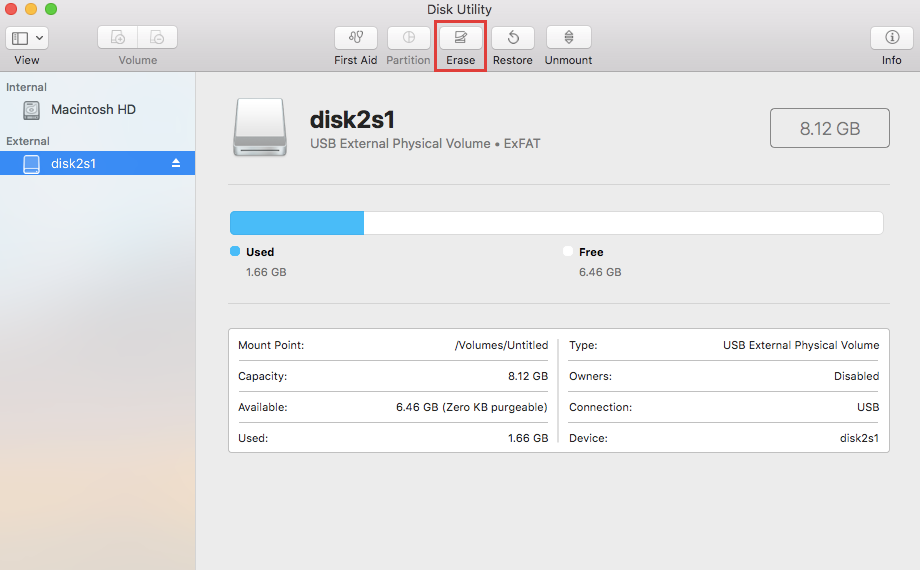
- 3.Run 'Disk Utility' applications on mac -> select 'Ambarell A9 DSC EVK Platf Media' -> click 'Erase'
-
- 4.Select 'ExFAT' -> click 'Erase' to start format.
Was this information helpful?
.svg)


Insta360 Trade-In
Ottieni di più dall’attrezzatura che non usi.
Persaperne di più
Iscriviti
Ottieni le ultime notizie da Insta360

Accetto l'Informativa sulla privacy e desidero ricevere via email le ultime novità e offerte di Insta360. Sono consapevole di poter annullare l'iscrizione contattando Insta360 quando desidero.


%20(1).svg)


%20(1).svg)

.svg)


Assistenza all'acquisto
Domande pre-vendita
Ordini & Pagamento
Resi & Rimborsi
 Orario d'ufficio: 9:00-18:00 (UTC+1)
Assistenza al prodotto
Risoluzione dei problemi & Assistenza
Riparazioni & Garanzia
Orario d'ufficio: 9:00-18:00 (UTC+1)
